Wireless VLAN Trunk
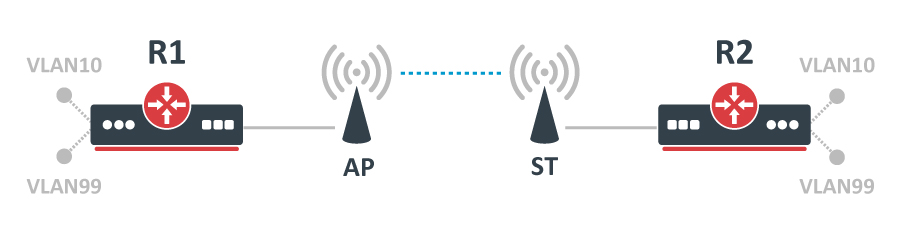
A very common task is to forward only a certain set of VLANs over a Wireless Point-to-Point (PtP) link. This can be done using bridge VLAN filtering and should be used instead of any other methods (including bridging VLAN interfaces). Let's say we need to forward 2 different VLANs over a Wireless link and all other VLAN IDs should be dropped. VLAN 10 is going to be our Internet traffic while VLAN 99 is going to be for our management traffic. Below you can find the network topology:
Configuration
Start by creating a new bridge on AP and ST and add ether1 and wlan1 ports to it:
/interface/bridge
add name= protocol-mode=none
/interface/bridge/port
add bridge= interface=ether1
add bridge= interface=wlan1
You can enable RSTP if it is required, but generally, RSTP is not required for PtP links since there should not be any way for a loop to occur.
For security reasons, you should enable ingress-filtering since you are expecting only tagged traffic. Then you can set the bridge to filter out all untagged traffic. Do the following on AP and ST:
/interface/bridge/port
set [find where interface=ether1 or interface=wlan1] frame-types=admit-only--tagged ingress-filtering=yes
Set up the bridge VLAN table. Since VLAN99 is going to be our management traffic, then we need to allow this VLAN ID to be able to access the bridge interface, otherwise, the traffic will be dropped as soon as you try to access the device. VLAN10 does not need to access the bridge since it is only meant to be forwarded to the other end. To achieve such functionality, add these entries to the bridge VLAN table on AP and ST:
/interface/bridge/vlan
add bridge= tagged=ether1,wlan1 vlan-ids=10
add bridge= tagged=ether1,wlan1, vlan-ids=99
:::info Interface Access Control
You can restrict management access to the device by interface. If you wish to prevent access from a specific interface (e.g., wlan1), simply remove that interface from the corresponding bridge VLAN entry.
:::
:::warning Handling Wireless & HW-Offloaded VLANs For devices with hardware-offloaded VLAN filtering and wireless support (e.g., RB4011, LtAP), exercise caution. Packets flowing from HW-offloaded ports to wireless interfaces may be dropped if CPU access for that VLAN is not explicitly permitted.
To allow CPU access for a specific VLAN:
- Add the bridge interface as a member of that VLAN (see the VLAN99 example).
- Alternatively, disable HW offloading on the affected bridge ports. :::
All devices (R1, R2, AP, and ST) need a VLAN interface created to be able to access the device through the specific VLAN ID. For AP and ST create the VLAN interface on top of the bridge interface and assign an IP address to it:
/interface/vlan
add interface= name=MGMT vlan-id=99
/ip/address
add address=192.168.99.X/24 interface=MGMT
For R1 and R2, do the same, but the interface, on which you need to create the VLAN interface, will probably change, depending on your setup:
/interface/vlan
add interface=ether1 name=MGMT vlan-id=99
/ip/address
add address=192.168.99.X/24 interface=MGMT
To allow more VLANs to be forwarded, you simply need to specify more VLAN IDs in the bridge VLAN table, you can specify multiple VLANs divided by comma or even VLAN ranges.
Setup the Wireless link on AP:
/interface/wireless/security-profiles
add authentication-types=wpa2-psk mode=dynamic-keys name=wlan_sec wpa2-pre-shared-key=use_a_long_password_here
/interface/wireless
set wlan1 band=5ghz-a/n/ac channel-width=20/40/80mhz-Ceee disabled=no mode= scan-list=5180 security-profile=wlan_sec ssid=ptp_test
Setup the Wireless link on ST:
/interface/wireless/security-profiles
add authentication-types=wpa2-psk mode=dynamic-keys name=wlan_sec wpa2-pre-shared-key=use_a_long_password_here
/interface/wireless
set wlan1 band=5ghz-a/n/ac channel-width=20/40/80mhz-Ceee disabled=no mode=station- scan-list=5180 security-profile=wlan_sec ssid=ptp_test
For each type of setup, there are different requirements. For PtP links NV2 wireless protocol is commonly used. You can read more about NV2 on the NV2 Manual page.
When links are set up, you can enable bridge VLAN filtering on AP and ST:
/interface/bridge
set vlan-filtering=yes
Double-check the bridge VLAN table before enabling VLAN filtering. A misconfigured bridge VLAN table can lead to the device being inaccessible and a configuration reset might be required.